
Market case · procurement workflow
A Cost-Center Change Should Reroute the Purchase Request
Airtable’s AirProcure case shows a practical procurement pattern: calculate the review route from the current request, reroute it when material facts change, and keep spending, legal interpretation and commitment with people.
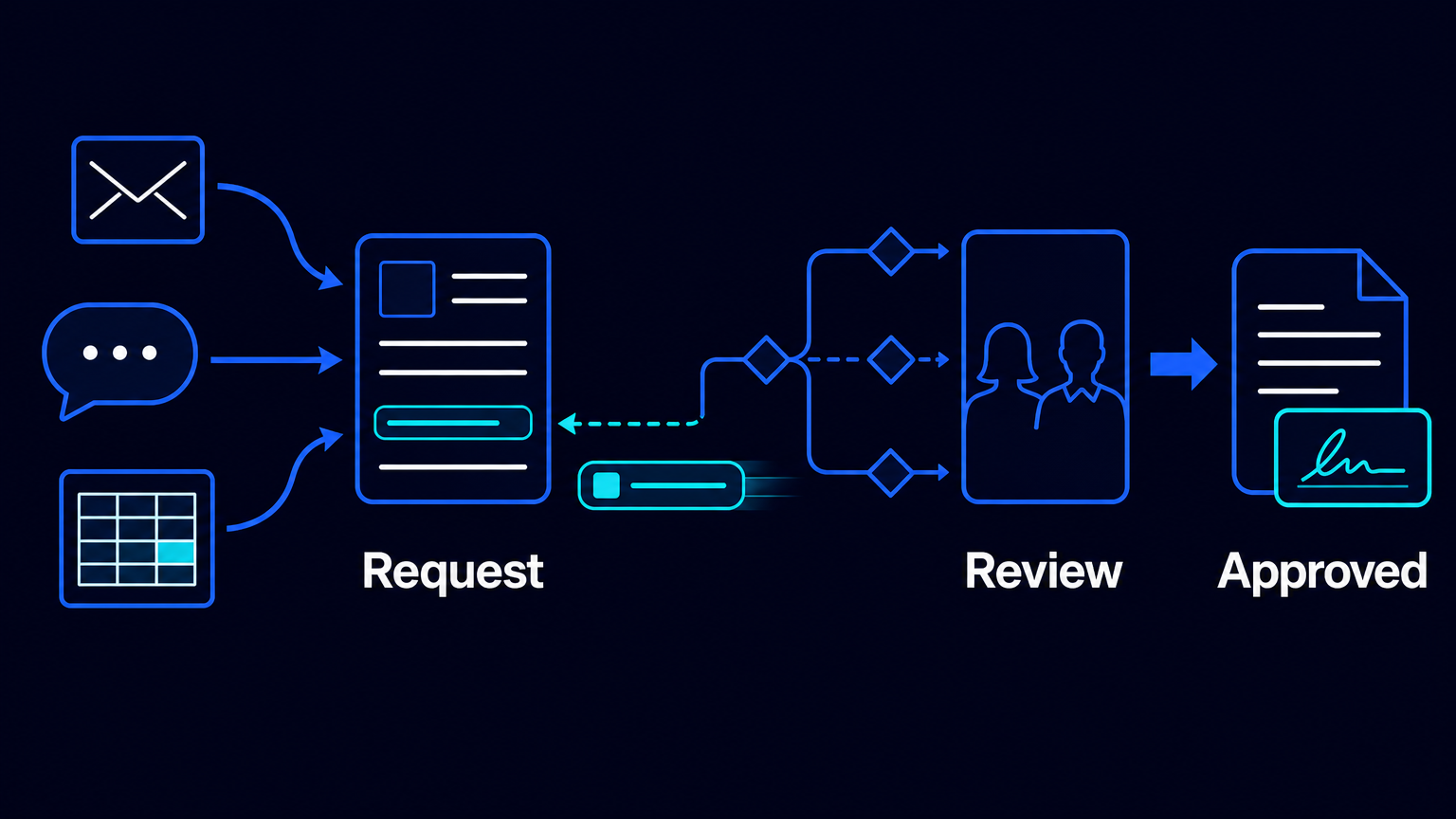
A procurement request does not stay still. Its amount can change. A cost center can be corrected. A supplier relationship can reveal a conflict of interest. A contract can arrive after the request has already entered review. If the approval route remains fixed while these facts move, the organisation is no longer reviewing the request it intends to fund.
This is the useful operating lesson in AirProcure, an internal procurement application described by Airtable. Airtable says its operations team built the application to route purchase requests, coordinate cross-functional approvals, extract contract terms and synchronise follow-on work with finance systems. It is a vendor-published account of Airtable’s own process, not an independent audit and not an AES result. Still, the workflow is concrete enough to examine.
The important idea is not “automated procurement.” It is narrower: automate calculation of the route from current request facts, but do not automate the business decision to incur an obligation.
The old process makes the coordinator the routing engine
Airtable describes purchase requests arriving through email, Slack and spreadsheets with uneven levels of detail. Someone then had to identify the required reviewers, chase information, establish status and revise the sequence when a meaningful field changed. That coordinator was performing an essential control function, but through memory, messages and manual reconstruction.
The weakness is not merely administrative delay. A request can be approved by the right people for an earlier version and still be wrong for the request now on the table. If a new cost center has a different budget owner, the original approval chain may no longer be relevant. If a conflict of interest is disclosed later, a review stage that was unnecessary yesterday may be required today.
A notification-based process does not solve this. More notifications can make a stale route more visible; they do not determine whether the route is still valid. The operating record needs to hold the facts that determine review, and the workflow needs rules that recalculate the route when those facts change.
What AirProcure changes—and what it does not
In Airtable’s description, a common intake form creates a structured request. The fields in that request determine the steps needed for review. Airtable gives two specific examples of dynamic routing: changing a cost center changes the approver, while indicating a conflict of interest adds a review step. The route is therefore derived from the request rather than copied from a coordinator’s private checklist.
- Collect the request through one structured intake form, rather than treating email, chat and spreadsheets as separate starting points.
- Store the attributes that matter to review: for example, the cost center and any declared conflict of interest.
- Apply explicit routing rules to those attributes and build the current review sequence from them.
- When a route-defining field changes, recalculate the sequence and make the changed state visible to the relevant reviewers.
- Use AI, where appropriate, to prepare information from supported document attachments; then obtain the required human approvals before creating downstream financial records or sending documents for signature.
Airtable says AirProcure connects approved work to the creation of purchase orders and vendors in a finance system, and to sending and receiving documents for signature. Its case description does not say the system independently accepts a spending commitment or signs a contract. That distinction should be retained in any implementation.
Document extraction is preparation, not legal judgment
Airtable’s AI fields can analyse text in supported attachments, including PDF, DOCX and XLSX files. This can be useful for bringing predefined contract terms or request details into a review record. It does not establish that the extracted information is complete, correctly interpreted or sufficient for a legal conclusion.
The technical limits matter. Airtable’s documentation says images inside documents are not analysed, and document size is limited by the context window of the model selected. Scanned agreements, tables, appendices and ambiguous clauses can therefore require a person to inspect the original document. A reviewer should be able to see both the extracted value and the source material before treating the value as decision-ready.
For Procurement and Legal, the practical design is simple: AI can prepare a field, flag a missing item or surface a candidate term. A responsible person still decides whether the supplier, exception, commercial condition or legal interpretation is acceptable.
The trigger needs to follow a meaningful state
Dynamic routing creates a second design problem: a workflow that reacts to every edit can repeatedly launch downstream actions. Airtable’s automation guidance warns that monitoring too broad a set of fields can cause repeated runs. It recommends testing triggers and actions before activation, and using a specific state transition where possible—for example, starting a downstream action when a record reaches Approved.
This suggests a useful separation. Changes to cost center, conflict status or another route-defining field may recalculate the review path. But the creation of a purchase order, vendor record or signature package should wait for an explicit approved state. A change after approval should not silently pass through to finance. It should return the request to an appropriate review state, with the reason visible.
Compute the route from the current facts. Release the financial action only from an explicit human-approved state.
The controls around the automation are part of the process, not technical decoration. Airtable provides a run history for successful and failed attempts, version history for prior configurations and their authors, and the ability to send failure notifications to multiple recipients for critical automations. A process owner can use these capabilities to investigate an unexpected route, restore a known configuration and ensure a failed handoff is not discovered only when a supplier asks for an update.
Where the pattern needs more design
A single intake form is not a claim that all procurement is uniform. Urgent purchases, regulated categories, unusual contractual terms, sensitive suppliers and conflicts may need separate paths and escalation rules. The point is to make those exceptions explicit, not to force them through a standard route because the form is convenient.
Nor should the route be treated as a permanent configuration. Budget ownership changes, approval thresholds move and internal policies are revised. Each rule needs a named owner, a review rhythm and a way to test the changed route with representative requests before it goes live. A route that was correct at launch can become a silent source of misapproval later.
A practical first boundary
For a procurement leader, the first question is not which AI feature to add. It is: which facts should change who must review this request? Start with a small set of material fields, map the responsible approver for each condition and define what happens when one of those fields changes after review has begun.
Then place a hard boundary between preparation and commitment. Automate intake, context assembly, route calculation, reminders and handoff. Keep budget approval, supplier choice, exception approval, legal interpretation and acceptance of the obligation with accountable people.
That is the business benefit Airtable’s case makes plausible: less manual route maintenance and less status hunting, without pretending that a routing system can decide whether the organisation should spend. If your approval path is currently maintained in inboxes and spreadsheets, it may be time to map the fields that should reroute it—and the human decisions that should not move.
Sources: Airtable, “Inside Airtable: The AI-Powered Procurement System,” https://static.airtable.com/sandbox/Inside_Airtable_-The-AI-Powered-Procurement-System.pdf ; Airtable Support, “Using Airtable AI in fields,” https://support.airtable.com/articles/8052242094-using-airtable-ai-in-fields ; Airtable Support, “Getting started with Airtable automations,” https://support.airtable.com/articles/3669392397-Getting-started-with-Airtable-automations ; Airtable Support, “Managing Airtable automations,” https://support.airtable.com/articles/3199652922-managing-airtable-automations

