
Process breakdown
A Webinar Attendee List Is Not a Follow-Up Queue
A project breakdown of how to turn webinar and event participation into routed CRM work—without treating attendance as buying intent or consent.
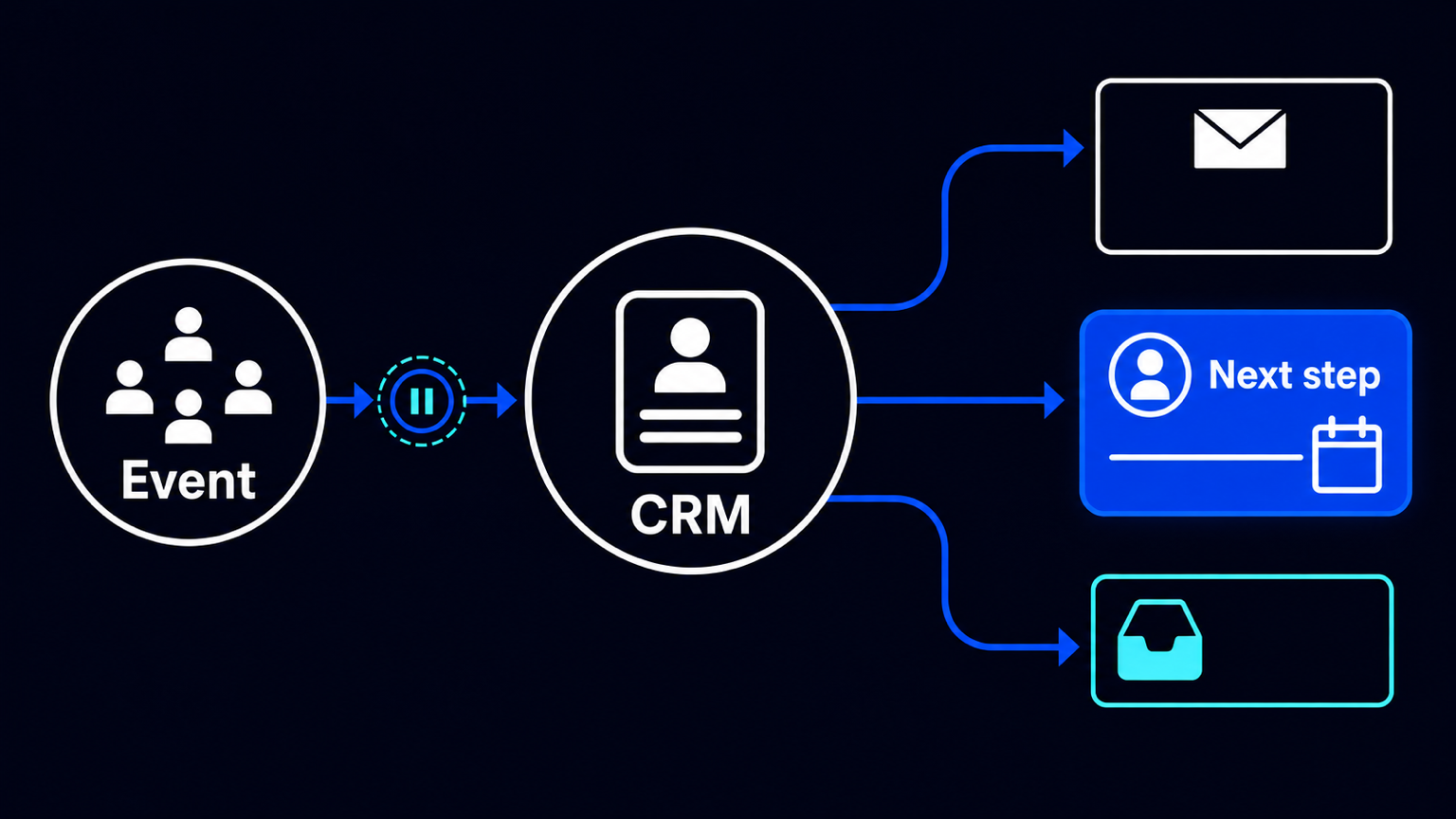
The most common post-event failure is deceptively simple: a webinar ends, and the business receives a list instead of a queue. Marketing has attendance data. Sales has a CRM. Someone exports a spreadsheet, removes obvious duplicates, sends one generic follow-up, and asks account executives to identify anyone worth contacting. By the time a person owns a next step, the event context has thinned out—or disappeared.
That is not primarily a messaging problem. It is a process-design problem. Registration, attendance, contact history, communication permission, account ownership and sales follow-up are treated as separate pieces of administration. The operating result is predictable: records are matched late, routine delivery competes with qualification work, and no one can see whether a promising contact received a timely review.
A better design does not attempt to infer a purchase decision from webinar behaviour. It turns event data into a controlled routing process: update the CRM, distinguish the states that are actually known, deliver standard materials only where communication is permitted, and place a contextual task in the right person’s queue when review is warranted.
The operating change: from a static export to a routed event record
This is a project design, not an AES implementation claim or a published customer result. Its building blocks are available in HubSpot’s documented Marketing Events and workflow capabilities. HubSpot can consolidate online and offline event information, and participants can be associated through imports, workflows or connected applications. Its listed integrations include Zoom, Microsoft Teams webinars, GoToWebinar and Eventbrite.
For Zoom webinars, HubSpot documents synchronization of registration and attendance. Teams can segment using registration, attendance and attendance duration; a contact record can show join and leave times. For Eventbrite, registration activity can be added to an existing contact or create a new contact, after which registration and attendance data can support segments and workflows. The relevant Eventbrite event must first be enabled for synchronization.
Those capabilities change the practical unit of work. The input is no longer “the attendee spreadsheet.” It is an event-associated CRM record with a known state: registered, attended, cancelled, or did not attend. For a webinar, attendance duration may be available as additional context. It is context, not a verdict on interest.
Before: one list, several disconnected decisions
- An organiser exports registrations or attendee names after the event.
- A marketer manually tries to match names and email addresses to CRM records.
- A standard email is sent to a broad group, while sellers receive an informal request to inspect the same list.
- The source event, participation state, record owner and proposed follow-up live in different places—or nowhere durable.
- Duplicates, missing fields and delayed integration updates are discovered while people are already acting on the data.
This arrangement creates two queues without naming either one. The first is operational: who should receive the recording, slides or a thank-you message? The second is commercial: which contacts deserve a human review and a considered next step? Combining them makes both worse. Standard fulfilment is delayed by sales triage, while sales review is buried in a broadcast list.
The intervention: five steps, with a deliberate wait
- Synchronize the event and its contacts into the CRM. Define the event source and retain the participation state that the source provides: registration, attendance, cancellation or no-show. Do not substitute a manually maintained attendance column when the connected source can provide the record.
- For webinars, retain available attendance duration and join/leave context as fields for segmentation. Treat these as observations. They may help a reviewer prepare; they do not establish fit, authority, budget or purchase intent.
- Wait for data to settle before routing. HubSpot notes that workflow records are evaluated against the data available when they reach an if/then branch. Where properties may not update immediately, its documentation recommends a delay. Branch order also affects the route selected. A workflow that branches instantly can therefore send a contact down the wrong path simply because synchronization is incomplete.
- Separate the routes. A permitted, routine communications route can deliver the recording or materials. A review route can create a time-bound task for the relevant owner, carrying event name, participation state and the available context. A third route should retain records that are incomplete, unmatched or otherwise unsuitable for automated progression.
- Make the human decision explicit. The owner checks the contact against the target profile, account history and current opportunity context; chooses a personal next action; and approves any offer, price, commitment or tailored message. Automation prepares and assigns work. It does not decide that someone is ready to buy.
Consent is a routing condition, not a footnote
The recording-delivery route needs its own rule. HubSpot’s guidance states that an attendee list received from the organiser of another company’s event is not, by itself, consent for bulk marketing email. A person who directly gave a brand their details through its form, business card or badge scan may be in a different position, but the applicable lawful basis still requires review for the relevant jurisdiction.
This distinction matters operationally. “Attended” and “may receive marketing email” should not be the same field, condition or decision. The workflow needs an explicit permitted-communications condition defined by the organisation’s rules. Contacts that fail it should not be silently pushed into a campaign merely because their event data arrived successfully.
What to measure after launch
The value of this design should be tested as a process, not assumed from the existence of an integration. Start with four measures: elapsed time from event end to CRM update; the share of eligible contacts that have an owner and a due date; matching errors or unresolved duplicate records; and the share of review tasks with no recorded outcome by their deadline.
None is a conversion claim. Together, they show whether the organisation has constructed a usable follow-up queue. If CRM updates arrive late, branches may be premature. If many eligible contacts lack an owner or due date, routing has not produced accountable work. If tasks close without an outcome, assignment may be substituting for qualification rather than enabling it.
Design for the awkward records
The clean path is not the whole process. Synchronization can lag. Contact fields can be incomplete. One person can register more than once. Event connections and workflow features may depend on the CRM subscription and configuration. The business must also define matching rules, duplicate handling, owner assignment and consent rules before automation begins.
A useful exception route is therefore not a failure state. It is a visible work queue for records that cannot safely receive the standard treatment. Someone can resolve an uncertain match, inspect a repeated registration or decide whether a record belongs in the CRM at all. That is more reliable than allowing an integration to hide uncertainty behind a completed sync.
The practical conclusion
After an event, the first objective is not to send more follow-up. It is to make the next action legible: what happened, which record it belongs to, whether routine communication is allowed, who must review it and by when. Once those conditions are in the CRM, marketing can fulfil the standard path and sales can apply judgment where it matters.
If your webinar or conference still ends in a spreadsheet handoff, map one recent event from registration through the first owner task. The gaps usually appear at the transitions: delayed synchronization, unclear permission, missing ownership or a task with no defined outcome. Those are the points worth designing before adding another campaign.
Primary documentation
- HubSpot Marketing Events: https://knowledge.hubspot.com/integrations/use-marketing-events
- HubSpot and Zoom webinars: https://knowledge.hubspot.com/integrations/use-hubspot-and-zoom-webinars
- HubSpot and Eventbrite: https://knowledge.hubspot.com/integrations/how-to-connect-hubspot-and-eventbrite
- HubSpot if/then workflow branches: https://knowledge.hubspot.com/workflows/use-if-then-branches-in-workflows
- HubSpot email opt-in consent: https://knowledge.hubspot.com/marketing-email/understand-opt-in-consent-for-email

