
Workflow design
When the Knowledge Base Cannot Answer, the Form Should Start Diagnosing
A workflow design for routing support requests from an approved customer answer into structured diagnosis—without treating an article view, an AI draft, or an escalation as a solved defect.
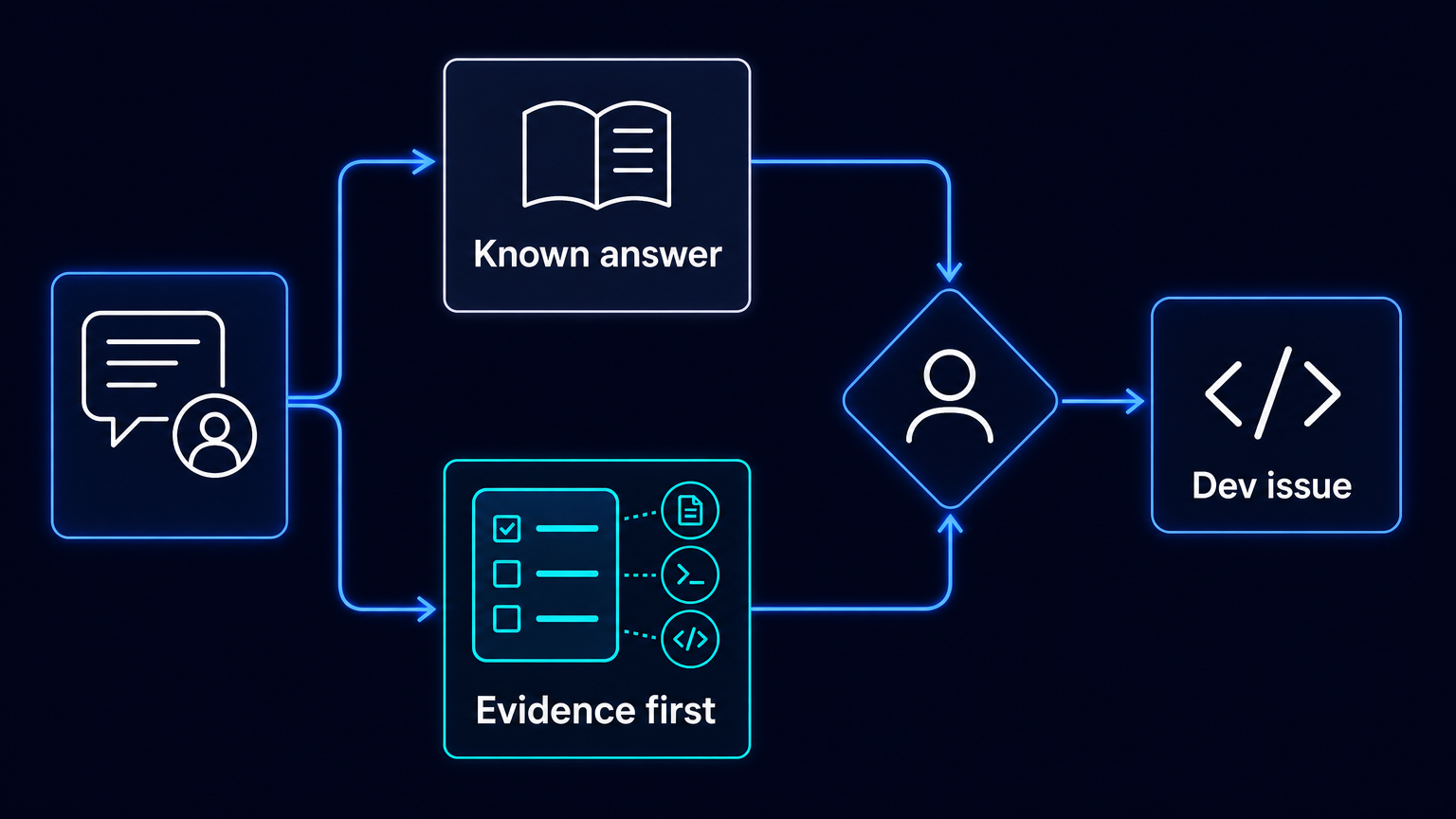
A knowledge base is useful when it answers a request. It becomes a delay when it merely postpones the same clarification cycle: Which release is affected? In which environment? What was expected? What actually happened? Can anyone reproduce it?
That cycle is often treated as a writing problem. Teams add more articles, improve search, or introduce generated reply drafts. Those measures can help, but they do not change what happens when a customer has already looked for an answer and still reports a malfunction. At that point, the support intake should stop behaving like an open mailbox. It should begin collecting the evidence needed to diagnose the route.
This is a workflow design, not a reported AES deployment or customer result. Jira Service Management documentation provides the building blocks: customer-facing and internal knowledge can be separated; portal users can receive suggested articles while entering a request; forms can use conditional sections and validation; and workflows can require fields or submitted forms before a transition. The operating point is to connect those capabilities into one deliberate branch: answer known questions early, but gather a usable reproduction packet when the known answer does not resolve the request.
The before state: one free-text request, several rounds of reconstruction
In an unstructured support flow, a customer describes a problem in a sentence or two. A support agent asks for the product version, environment and expected behaviour. The customer returns later with partial details. The agent asks for timestamps, screenshots or a way to reproduce the issue. Eventually, an engineering ticket is created with an incomplete narrative. Engineering returns it because the report cannot be reproduced, or spends time finding the facts that should have accompanied the escalation.
The defect may be real. The problem is that the organization has treated two different kinds of work as one: answering a known question and investigating an unknown malfunction. The first needs an approved, customer-safe explanation. The second needs structured observations, bounded evidence and a human decision about whether engineering should receive the work.
A split route: answer first, diagnose when necessary
The proposed flow has five connected elements. It should be configured to fit the service catalogue, product architecture and privacy rules of the organization rather than copied as a universal form.
- Show approved external knowledge articles as the customer writes a request summary. Jira Service Management supports article suggestions in the portal. Keep this source separate from internal runbooks and sensitive procedures: Atlassian distinguishes external customer knowledge from internal knowledge intended for agents.
- Let the customer continue when the article does not resolve the issue. If they select a malfunction category, reveal a conditional diagnostic section rather than presenting every technical field to every requester.
- Validate the minimum reproduction packet before the request can move to an engineering-ready state. At a minimum, collect the affected product and release, environment, steps, expected result, observed result, occurrence time, impact, sanitized evidence, reproduction status and any known workaround.
- Give support an internal review step. An agent may use linked knowledge and similar resolved requests to prepare a reply draft, but reviews, edits and sends the response. A useful draft is not a decision that the customer is correct, nor proof that a defect exists.
- Require a human support decision before escalation. The service request can be connected to an existing engineering work item or used to create a new linked one. Exact field mapping, attachment handling and permissions must be configured and tested; they should not be assumed from the existence of a link.
The knowledge route and the diagnostic route need different sources
The external route should contain approved material that customers may see: setup guidance, supported configurations, known limitations and safe workaround instructions. Its job is to make a verified answer available early.
The internal route can contain agent runbooks, triage guidance and restricted operating procedures. Its job is to help support assess the request without exposing sensitive details. Conflating these repositories creates an avoidable choice between giving customers too little help and disclosing too much operational information.
This separation also makes the measures more honest. Atlassian counts a portal request as deflected when the customer selects a suggested article and votes it helpful. An article impression is not evidence that the problem was resolved. A team should preserve that distinction rather than declaring every displayed article a successful containment.
Make the form selective, not exhaustive
A long technical form at the start of every request is not better intake. It asks customers to diagnose the system before the organization has established that diagnosis is needed. Conditional sections allow the form to reveal deeper questions only after the requester identifies a malfunction category or confirms that the suggested answer did not help.
The form should require useful facts, not unsafe material. Screenshots, logs and traces may contain personal data, credentials, session tokens or confidential content. If evidence cannot safely be supplied, the requester should record that fact explicitly. Support can then choose a safe collection route instead of encouraging unrestricted logs to enter a general ticket.
Workflow rules provide a practical quality gate. A transition to an engineering-ready status can require the relevant fields or a submitted form. That does not prove reproducibility. It does ensure that an escalation cannot silently bypass the organization’s agreed minimum packet.
What automation may do—and what remains human work
Automation can present the right branch, check required fields, link records and create a work item after the configured conditions are met. A knowledge-based draft can help an agent compose a response. These are useful reductions in administrative repetition.
They are not a substitute for technical judgment. Support decides whether the information is sufficient and whether escalation is appropriate. Developers determine root cause, change code, test changes and decide what enters a release. No part of this design implies autonomous modification of production code, release or rollback.
Measure a better handoff, not a more active system
Take a baseline from existing tickets before changing the form. Then compare the same request categories after implementation. Three measures are particularly useful: median and p90 time to the first substantive, sourced response; the share of escalations that require no follow-up for missing information; and the share accepted by engineering without a return to support.
An acknowledgement should not count as a substantive first response. Nor should a created engineering item count as acceptance. The definitions matter because otherwise a workflow can appear faster simply by moving incomplete work earlier in the queue.
Start with one malfunction class
Do not begin by redesigning every support request. Choose one recurring malfunction class with recognizable reproduction needs, review a sample of historic tickets and identify the missing facts that caused the most clarification loops. Build the external answer route, the conditional questions and the escalation gate around that class. Review requests that still return from engineering, then change the form only where the evidence supports it.
The practical result is not an automated support organization. It is a cleaner boundary between a question that can be answered and a problem that must be investigated. When the knowledge base cannot solve the request, the next screen should help the customer and support team describe the problem well enough for an engineer to act.
Sources
- Atlassian, “The difference between internal and external knowledge bases”: https://support.atlassian.com/jira-service-management-cloud/docs/the-difference-between-internal-and-external-knowledge-bases/
- Atlassian, “How are my knowledge base articles performing?”: https://support.atlassian.com/jira-service-management-cloud/docs/how-are-my-knowledge-base-articles-performing/
- Atlassian, “What are forms?”: https://support.atlassian.com/jira-service-management-cloud/docs/what-are-forms
- Atlassian, “Draft replies for your customers using Atlassian Intelligence”: https://support.atlassian.com/jira-service-management-cloud/docs/draft-replies-for-your-customers-using-atlassian-intelligence/
- Atlassian, “Using the new workflow editor”: https://support.atlassian.com/jira-service-management-cloud/docs/using-the-new-workflow-editor/
- Atlassian, “Link subtasks, issues and pages from the new issue view”: https://support.atlassian.com/jira-service-management-cloud/docs/link-subtasks-issues-and-pages-from-the-new-issue-view/

