
External case · Virgin Voyages
Virgin Voyages Cut One Weekly Status Report From Five Hours to 30 Minutes
Virgin Voyages replaced manual reconstruction of one department-wide weekly report with a live view of current work. The case shows why a management report should be generated from operating records, not assembled as a second process.
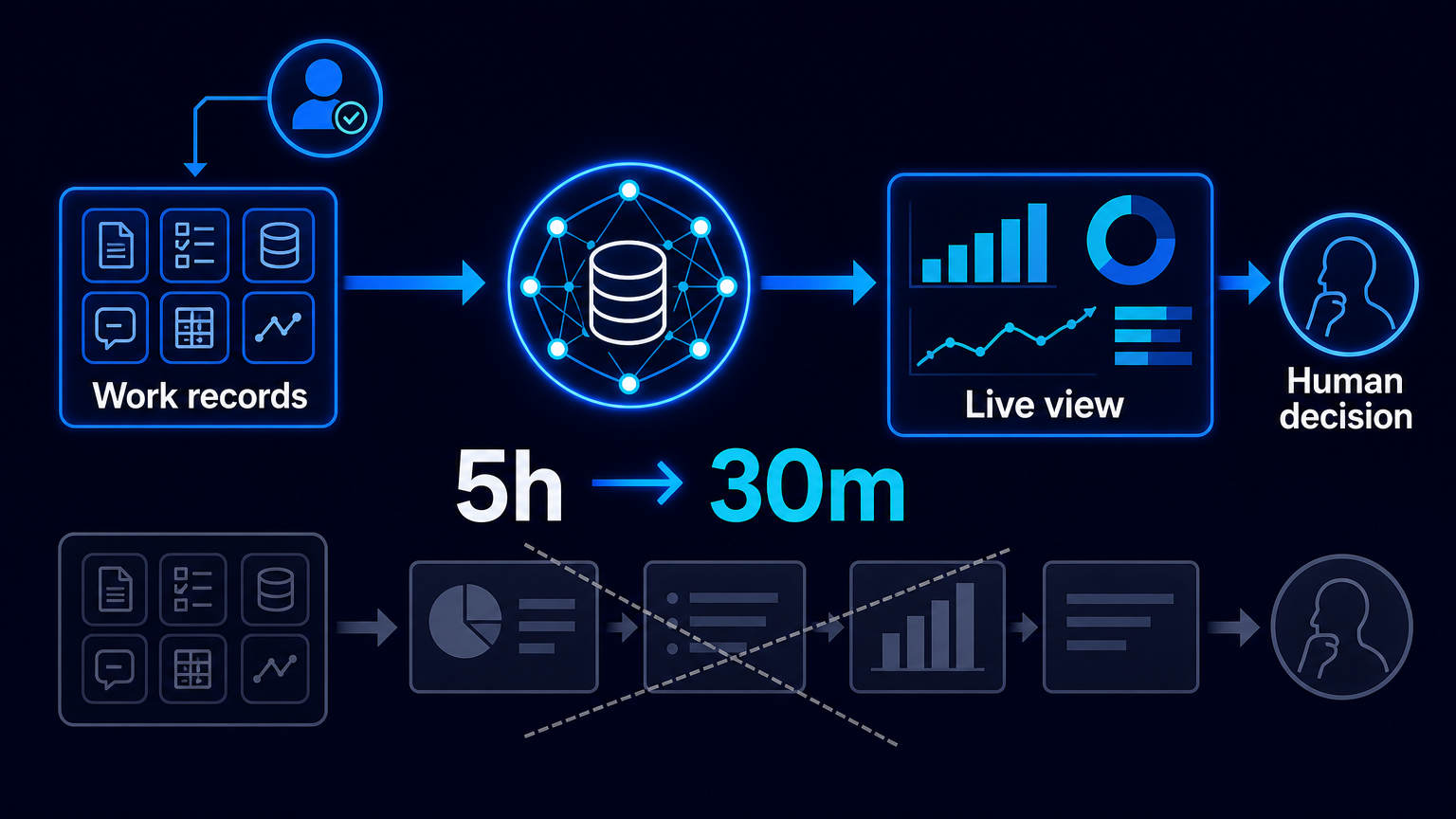
A weekly management report often looks like an information product. In practice, it is frequently a reconstruction job: teams search for current files, ask colleagues for updates, reconcile versions, move figures into a spreadsheet, then turn the spreadsheet into slides. By the time leadership sees the deck, the work has moved on.
Virgin Voyages offers a bounded example of an alternative. In an undated customer story, verified on 11 October 2026, Airtable says that one department-wide weekly status report fell from five hours of preparation to 30 minutes. The result belongs to Virgin Voyages as reported by Airtable, not to AES, and it concerns one weekly report rather than all reporting at the company. Still, the underlying process is broadly useful: stop rebuilding a picture of work when the operating records can provide it directly.
The report was downstream of fragmented work
According to Airtable’s account, Virgin Voyages had a marketing organisation of more than 80 people across content, social, CRM, PR, partnerships and performance. Teams worked through Google Docs, Slides and spreadsheets. Campaign timelines were difficult to follow, approvals could lag, and cross-functional visibility was limited. Some presentation decks exceeded 100 pages.
This is a familiar failure mode in business operations. The team does work in one set of places, then constructs a separate reporting process to explain that work. Each weekly cycle creates another request for status, another round of copying and another opportunity for a stale version to become the management record. More effort spent polishing the deck does not fix that structural gap.
The intervention was not a faster slide deck
The reported change was a connected operating system for the marketing workflow. It covered briefs, asset timelines, shoot logistics, production coordination, legal approvals, version-controlled asset workflows and performance tracking. For weekly reporting specifically, Airtable describes live dashboards replacing manual spreadsheets and slide decks.
Translated into a reusable process design, the sequence is straightforward. First, define the records that represent real work: campaign, asset, approval, deadline, owner and performance item. Second, make each record have a responsible human and a practical update rule. Third, connect routine handoffs and notifications to those records rather than to separate reporting files. Fourth, generate a management view from the current records. Fifth, surface incomplete, overdue or blocked items as exceptions for review.
The crucial design decision is that the live view is not an additional destination for manual updates. It is a view over the operational source. If a manager still has to chase status in chat and amend a dashboard by hand, the organisation has merely replaced slides with a more attractive second system.
Automation releases preparation time; people still run the work
The arithmetic in the Virgin Voyages case is clear. Five hours minus 30 minutes equals 4.5 staff-hours released on each weekly preparation cycle. Airtable labels this as 90% time savings. It should not be converted into payroll savings, eliminated roles or return on investment: the source does not disclose whether that capacity was removed, reassigned or used for exception handling. It also does not disclose the observation period, the number of weekly runs, the measurement method or how exceptions were treated.
That limitation does not weaken the operational lesson. It defines it. A live report reduces the work required to assemble a status view; it does not guarantee that the underlying status is current or correct. People remain accountable for updating records, resolving ambiguity, making creative and legal approvals, setting priorities and deciding corrective action. Automation can aggregate records, send routine reminders and render a view. It cannot make an unowned deadline reliable.
Access design is part of the reporting design
A consolidated management view can also widen the audience for sensitive operational data. Airtable’s documentation says dashboard interfaces are intended to communicate workstream status to leadership and partner teams. Its sharing guidance warns that access to an underlying base can expose data, automations and every interface, while field and table permissions still apply inside interfaces.
Before publishing a live view, owners should therefore decide which role can see which records and fields; test the view with those roles; restrict sensitive budget, personnel, customer or legal information; and establish what happens when a required field is missing. A dashboard without access discipline can replace manual reporting risk with unnecessary disclosure risk.
Start with a report that people dread preparing
Do not begin by digitising every report. Choose one recurring report that consumes visible preparation time and is supposed to answer a clear management question. Map the records from which each line of the report should originate. Mark every field that is manually retyped or sourced from a private spreadsheet. Then distinguish routine aggregation from exceptions that need an owner’s judgment.
The test is simple: can a manager open the view on Tuesday and see the same current work that teams are using on Monday? If not, the report is still a reconstruction. Virgin Voyages’ reported five-hours-to-30-minutes result is not a universal benchmark, but it is a useful prompt. Which weekly report in your organisation is still being rebuilt manually instead of generated from the work itself?
Source: Airtable, “Virgin Voyages” customer story, undated, accessed 11 October 2026: https://www.airtable.com/customer-stories/virgin. Airtable documentation on dashboard interfaces and sharing permissions: https://support.airtable.com/articles/5415824889-airtable-interface-layout-dashboard and https://support.airtable.com/articles/4255096925-managing-and-sharing-airtable-interfaces.

