
External case · Business operations
Wolters Kluwer Turned the Management Report Into a Data Flow
A Smartsheet customer case from Wolters Kluwer Financial Services Solutions shows a practical shift: maintain the operational records continuously, then let management reporting emerge from them.
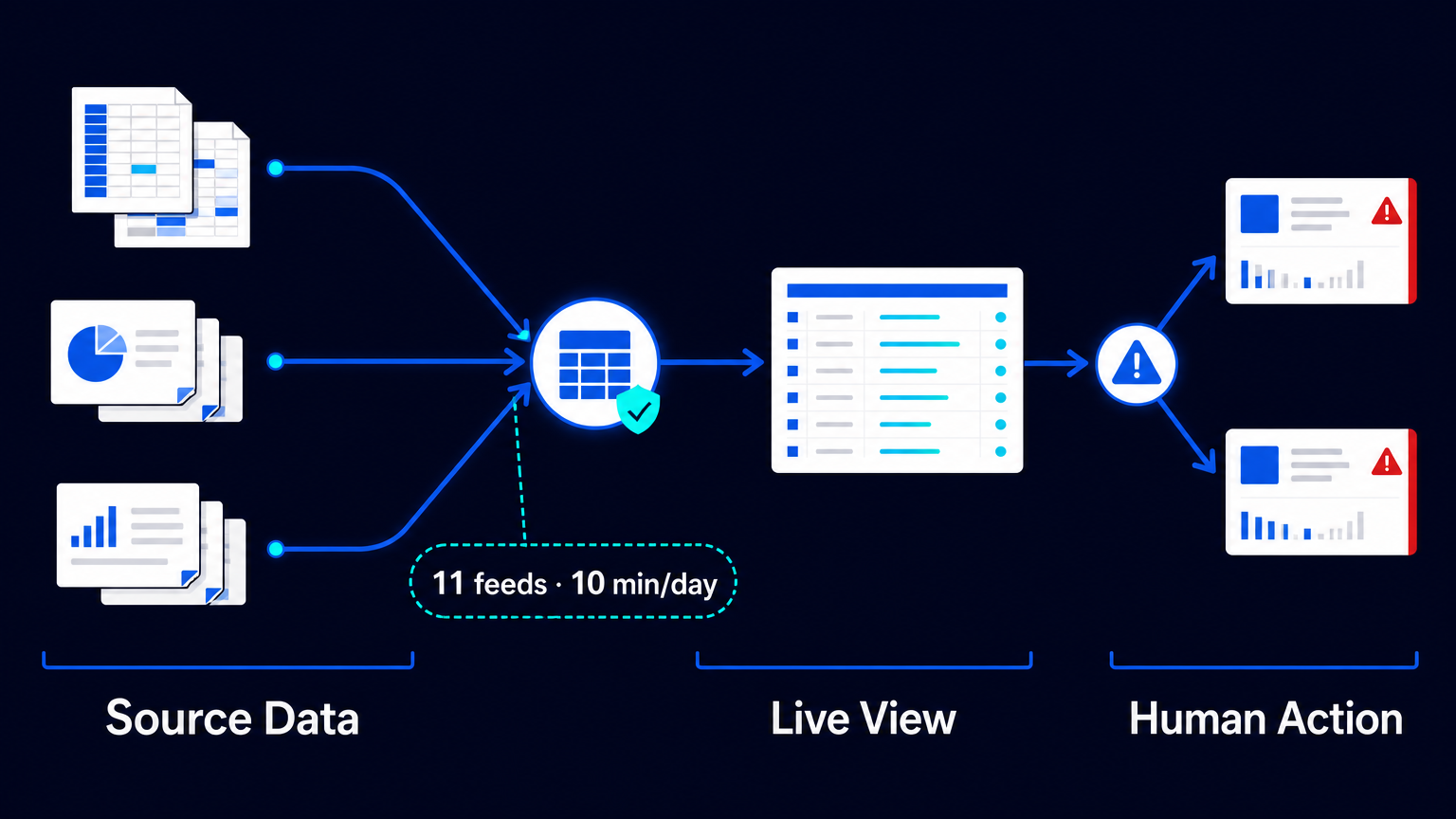
A management report is often treated as a meeting deliverable: a manager collects spreadsheets, checks dates, copies numbers into slides, and takes screenshots shortly before executives convene. The document may look finished, but the process is not. It is a daily assembly job whose inputs are already becoming stale.
A 2024 Smartsheet customer case describes how Wolters Kluwer Financial Services Solutions changed that pattern for software implementation and testing work. The division manages thousands of projects. Its reported design did not make managers unnecessary or turn dashboards into decision-makers. It made recurring reporting the output of maintained project and financial records rather than a separate reconstruction exercise.
This is a vendor-published customer account, not an independent audit and not an AES result. Its value lies in the operating mechanism: standardize the records, connect the recurring inputs, synchronize the fields that must agree, and give each role a current view. Human attention can then move from assembling a report to examining the projects that need intervention.
Before: nine teams, separate files, one recurring reconstruction
According to the case, nine software-product teams used different project-management methods. Project information lived in separate spreadsheets on desktops or a shared drive. That arrangement made consistent tracking and reporting difficult. It also created a familiar management rhythm: the closer the meeting, the more effort went into reconciling a view of work that should already have existed.
The problem was not simply that there were many files. A spreadsheet can be useful within a team. The problem emerged when a leadership report had to combine project progress, billing information, contract dates, deadlines and budget signals across teams that did not maintain those items in one consistent structure.
In that setting, PowerPoint and screenshots can become an unofficial integration layer. They summarize information for a moment, but they do not preserve a working connection to the records beneath them. A changed date, a revised budget position or a newly identified risk can require another manual pass before the next review.
The intervention: make reporting depend on maintained records
Wolters Kluwer Financial Services Solutions used a combination of standardized templates, data ingestion, synchronization and role-specific views. The important design choice was sequence: establish a consistent project record first; then make reporting consume that record instead of asking people to rebuild it in another format.
- Use Control Center templates to create consistent project and financial records across the work.
- Pull project and billing data from SharePoint with Data Shuttle, assigning unique project identifiers to imported records.
- Keep sheets and reports synchronized with DataMesh, including contract start and end dates.
- Publish more than 20 financial dashboards through WorkApps for executive and customer views.
- Use warning states and current views to direct managerial attention to projects that require it.
Each step solves a different operational problem. Templates reduce variation at the point where work is created. Unique identifiers give imported records a stable way to connect. Data ingestion removes a repeated transfer from the reporting routine. Synchronization reduces the risk that a date or financial field is updated in one place but not another. Dashboards distribute the resulting view without turning every executive request into a new slide-building task.
The reported result is narrow—and useful
The source attributes two separate time observations to a named project manager. She said that assembling a report had previously taken two hours a day and later took a few minutes. Separately, she described a data-movement task that had taken three hours for one feed; the resulting reporting workflow operated with 11 feeds and took 10 minutes per day.
Those observations should not be added together. The case does not establish that the activities were non-overlapping, and it does not say that every one of the 11 feeds had previously taken three hours. It also provides no company-wide sample, observation period, payroll saving or audited return on investment. The 10-minute figure describes one project manager’s reporting workflow, not a universal benchmark for the division’s thousands of projects.
Still, the operational consequence is clear. When the recurring work is to maintain records and handle exceptions, daily reporting can become lighter. When the recurring work is to reconstruct a document, every new review competes with the work being reviewed.
What automation did not decide
The dashboards did not validate the underlying facts by themselves. They did not decide whether a project was healthy, approve a budget response or resolve a missed deadline. In the documented workflow, project managers continued to monitor deadlines and budgets. Executives used warning states to identify where attention was needed and then exercised judgment about what to do.
That boundary matters. Automation can carry records from an agreed source, synchronize designated fields and present a current view. It cannot compensate for a project status that was not updated, a billing record that is wrong, or an exception that nobody owns. The accountable person must remain visible at precisely the points where data becomes a management decision.
A practical test for your reporting process
The useful question is not whether every spreadsheet should disappear. It is whether the management report is derived from an operating process or assembled beside it. If a report requires a recurring hunt for files, manual comparison of dates, copying into presentation software and last-minute requests for clarification, the report is functioning as a repair layer.
- Identify the small set of project, financial and contractual fields that leadership actually uses to direct attention.
- Define where each field is maintained and who is responsible for its correctness.
- Give every project a durable identifier before connecting records from different sources.
- Automate repeatable ingestion and synchronization only after the field definitions and ownership are clear.
- Design views around decisions and exception review, not around reproducing every source-system column.
- Keep a human review point for stale records, contradictory values and actions that affect budget, commitments or customers.
The lesson from this external case is not that a dashboard solves management reporting. A dashboard is only the visible end of the process. The harder and more valuable work is to make the operational record maintainable enough that the report no longer needs to be rebuilt every day.
If your management pack is still assembled in the days before a meeting, map the path from source record to executive action. The best first automation is often not a new dashboard. It is the one repeated handoff that forces someone to recreate information already held elsewhere.

