
External case
Scentia Automated the Paper Chase, Not the Doctoral Judgment
Scentia’s documented workflow moved applicant routing, follow-ups and status updates out of email administration. It did not show automated eligibility decisions, university matching or professional advice.
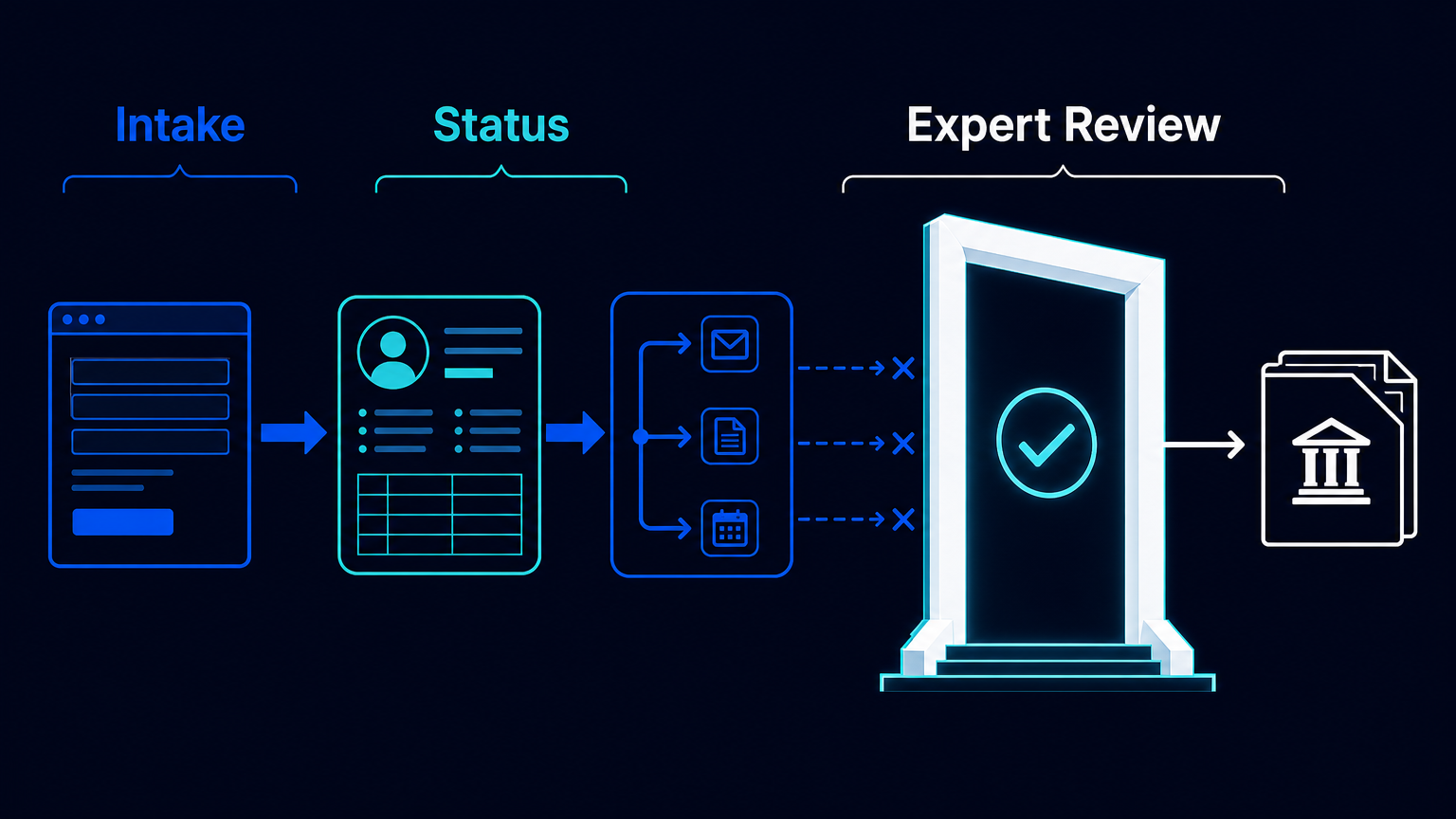
In expert services, the most expensive administrative work is often not a large report or a complex calculation. It is the paper chase around the work: creating a record from an enquiry, asking again for a missing document, copying a status from email into a CRM, and working out which applicant needs attention next.
Scentia, a Hamburg-based service that supports working professionals with doctoral applications and dissertation work, offers a useful boundary for this kind of automation. In a customer story published by Make on May 19, 2021, the company described automating the movement and follow-up of applicant information. The source does not document automation that decides doctoral eligibility, selects a university, or replaces the consultation itself.
That distinction is the operating lesson. A professional service can automate the administrative path around an expert decision without pretending that the decision has become administrative.
Before: an application started as an email problem
Before the workflow, Scentia used a WordPress contact form, Pipedrive and Office 365. A website enquiry arrived through the form, but staff had to create the lead in the CRM manually. Later status changes received by email also had to be transferred by hand.
The underlying engagement could last weeks or months. It required close communication with an applicant and collection of certificates, transcripts, references and recommendation letters. Staff requested documents, verified them, and uploaded them to Pipedrive. These are not isolated clicks. Together, they make the current state of an application difficult to see and easy to reconstruct incorrectly when work is spread across inboxes and records.
The consequence is more serious than a slow response. When the responsible person must repeatedly rebuild the file’s state, the next useful action competes with transcription. A consultation that should address an applicant’s situation can begin with a search for the latest email and an inventory of missing attachments.
What changed: the administrative state became a shared route
Make’s account describes a workflow that connected the intake and follow-up steps already surrounding Scentia’s service. A new form submission was routed to the responsible employee. Applicant information was stored in Airtable through a webhook. Outlook was connected for predetermined follow-ups, and Pipedrive statuses tracked each candidate and the next required steps.
- A prospective applicant submits the website form.
- The workflow routes the submission to the responsible employee and creates a structured applicant record in Airtable.
- Predetermined Outlook follow-ups support requests and reminders that belong to the administrative sequence.
- Pipedrive records the candidate’s status and the next required step, giving the team a current operational view.
- A staff member reviews documents and handles the professional work that cannot be inferred safely from workflow state alone.
This is not an autonomous admissions system. It is a connected administrative path: intake is captured once, the responsible person is visible, routine follow-ups have a defined trigger, and status is held as a record rather than dispersed through correspondence.
What did not change: expertise remained outside the flow rules
The published case documents routing, follow-up and status handling. It does not document automated academic-eligibility decisions or automated university matching. That absence matters. A form field, a complete-looking file and a CRM stage are not evidence that an applicant is suitable for a particular doctoral path.
For a comparable process, document sufficiency, applicant suitability, advice and any external submission should remain explicit staff decisions. Exceptions and sensitive records should not advance merely because a timer fired or a record contains the expected fields. The workflow can indicate that review is due; it should not convert a pending review into a professional conclusion.
This boundary also prevents a common design error. Teams sometimes try to make a process appear end-to-end by turning every step into a status transition. In an expert service, that can conceal the point at which judgment, responsibility and a conversation with the client are required. Better automation makes that point more visible, not less.
The benefit is capacity for the work clients actually buy
Make reports that Scentia redirected released time toward consultations and additional outreach. This is a vendor-published customer account, not an independent audit. Make also reports approximately ten workload hours released per week, but does not disclose the team population, observation period, calculation method or treatment of exceptions. That figure is therefore not a reliable planning baseline for another firm.
The qualitative result is still concrete. The process removes duplicate transcription and repeated chasing from the center of the work. It gives the team a shared current status for each applicant. That can free staff attention for consultations, document review and the cases that need interpretation rather than another reminder.
It does not establish a change in doctoral acceptance rates, applicant conversion, revenue or service quality. Those outcomes were not documented in the source and should not be attributed to the workflow.
Build the boundary before connecting the tools
A firm designing a similar process should start with the handoff, not the application menu. Define which intake fields create a record, who owns the first review, which reminders are genuinely predetermined, and which stage changes require human confirmation. Then define exception paths: incomplete submissions, contradictory documents, requests to pause, withdrawals, and records that require restricted access.
The storage design also deserves its own decision. The Scentia account shows Airtable, Pipedrive and email in the workflow, but it does not establish that those systems alone are an appropriate repository for sensitive applicant documents. Access, retention, document handling and the treatment of exceptions need a separate design appropriate to the organisation and the records involved.
Measure the workflow where it is actually changed: time from enquiry to assigned owner, records requiring manual re-entry, overdue follow-ups, and the age of applications waiting for review. Do not convert released administrative time into payroll savings unless staffing cost genuinely changes. In many consulting and mentoring businesses, the more honest benefit is capacity returned to higher-value client work.
The practical takeaway
Scentia’s case is a useful reminder that the right scope for automation is often narrower than the whole client journey and more valuable than a generic chatbot. Capture the intake once. Maintain an operational status. Trigger the repeatable follow-up. Then stop at the point where a professional must assess evidence, advise a person or take responsibility for an external submission.
If your advisory process is held together by forms, inboxes and repeated status updates, map the administrative route separately from the expert judgment. The first is often ready for automation. The second needs a visible human gate.
Source: Make, “Customer onboarding automation case study: Scentia,” published May 19, 2021. Make reports the case as a customer story; its reported outcomes are attributed to that source.

