
External case · invoice operations
TIME Stopped Making Vendors Ask Where Their Invoice Was
TIME’s invoice workflow connected one finance-reviewed status to vendor notices and budget views. The lesson is not automatic payment: it is eliminating separate status-chasing and reporting processes.
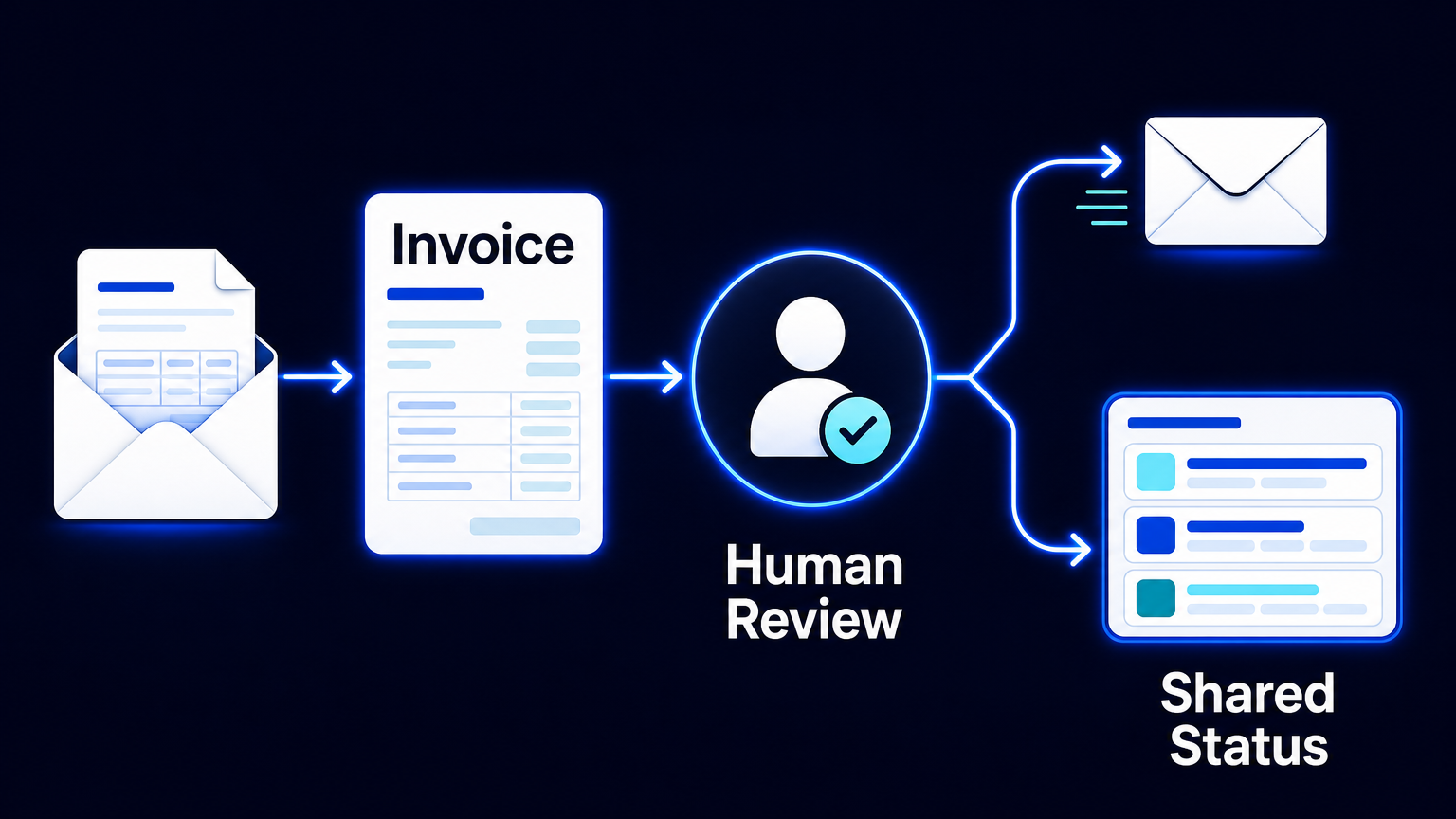
A vendor asking, “When will this invoice be paid?” is usually not a communications problem. It is a process design problem. The answer exists somewhere—in an inbox, a spreadsheet, an accounting queue, or a finance colleague’s memory—but it is not available from the operational record that the vendor and budget owner depend on.
TIME’s video-production team redesigned that condition. In an Airtable customer story, TIME describes a workflow for production budgeting, invoice tracking, and vendor payment coordination. Its production coordinator had been entering the same invoice information into multiple spreadsheets, manually telling vendors when payment was expected, and separately preparing budget updates. After the redesign, a changed invoice status could send a vendor an email containing the expected payment date and a copy of the invoice. The same underlying records supported budget views by project, vendor, and timeframe.
This is a vendor-published customer account, not an independent audit, and it provides no measured before-and-after sample for time or cost savings. Its qualitative result is still operationally useful: TIME’s coordinator said recurring monthly payment-status inquiries stopped; managers needed fewer manual check-ins and reports; and the team could cancel standing meetings. The case is not evidence that every invoice process will produce the same outcome. It is evidence of a concrete design choice: make the reviewed invoice status the shared source for communication and reporting.
The old process created three copies of the same question
Before the redesign, an invoice did not become one operational object. Its data was copied into multiple spreadsheets. A vendor waiting for payment had to ask for an update. The coordinator then had to locate the current state and send a manual reply. A budget owner needed a report, which meant another manual reconstruction of amounts by project or period.
Each activity looks small in isolation. Together, they create three parallel processes around the same event: invoice administration, vendor reassurance, and budget reporting. The burden is not only repeated data entry. It is repeated interpretation. Someone must decide which spreadsheet is current, whether the date is still valid, whether an invoice belongs to the correct project, and whether the budget view includes pending or approved amounts.
A dashboard added on top of fragmented spreadsheets does not solve this. It can display inconsistent data faster. Nor does an automatic email help if it is sent when an invoice is merely received rather than when a responsible finance person has validated its documentation and set a meaningful status or payment date.
The redesign: one record, then controlled propagation
The useful unit of work is one invoice record linked to the vendor, production project, and relevant budget. That record should hold the fields needed to run the process: the invoice document, amount, received date, project link, vendor link, status, expected payment date, and an exception or follow-up state where needed. Structured intake can create the initial record. Airtable’s documentation confirms that a form submission can create a record, but also makes an important boundary clear: a form is not a signing system and does not verify a signer’s identity or create a signing audit trail.
From there, the process is deliberately narrow:
- A vendor submission or internal intake creates one invoice record rather than a new row in each reporting file.
- The record is linked to its vendor, project, and budget context so that the same amount can later be viewed in the right operational frame.
- Finance validates the documentation, resolves contract, tax, duplicate, or allocation exceptions, and sets the approved status or expected payment date.
- Only when the record enters the defined communication status does automation send the vendor notice with the relevant payment date and invoice copy.
- Approved or scheduled amounts are aggregated from those linked records into project, vendor, and timeframe views.
- Managers use filtered views based on those records instead of waiting for a separately assembled budget report.
This sequence matters because notification is a consequence of a reviewed state, not a substitute for review. Airtable’s automation guidance recommends triggering when a record starts matching a defined condition—for example, when it enters an approved status—rather than on every edit. It also recommends conditions that prevent duplicate actions. In practice, that means recording whether a particular status notice has already been sent, and deciding what should happen if a date changes after the first notice.
What changed—and what did not
What changed at TIME was the path from an internal status change to two audiences. Vendors could receive an update from the invoice record when its status changed. Budget owners could see current amounts through views by project, vendor, or timeframe. Airtable’s documentation supports this pattern: linked-record rollups can aggregate values and limit them with conditions; dashboards can present filtered counts, charts, and record lists from the underlying tables.
What did not change is equally important. The workflow did not approve an invoice, decide whether documentation was valid, interpret a contract, resolve a tax issue, authorize spending, or move money. Those remain finance and payment-system actions. A budget view also does not make the data accurate. It reflects the quality of project links, documents, statuses, dates, and exception handling maintained by responsible people.
The automation should propagate a finance decision, not manufacture one.
The operating consequence is fewer status systems, not fewer responsibilities
For a finance lead or production operations owner, the design target is not an impressive dashboard. It is the removal of separate systems for status chasing and budget reporting. When the invoice record is authoritative enough for the vendor update and the management view, manual work shifts from copying and explaining routine states to reviewing exceptions that actually require judgment.
That is also why the implementation should begin with state definitions rather than a form or dashboard. Define which statuses exist, who may set each one, which status may trigger an external notice, which amount belongs in each budget view, and how corrected invoices, partial payments, rejected documents, and changed payment dates are handled. A vague status such as “in progress” cannot safely drive a vendor promise. A status such as “payment date confirmed,” owned by finance and paired with a date, can.
TIME reports that the redesigned workflow ended recurring payment-status inquiries, reduced manual reporting and check-ins, and allowed standing meetings to be cancelled. Those are TIME’s reported outcomes, not a promise or an AES result. The transferable lesson is more modest and more durable: one reviewed operational state can serve several audiences, provided the human decision and the exception paths remain explicit.
A practical starting point
Take one recurring vendor question and trace it backward. Which record currently answers it? Who decides that the answer is reliable? Where is the same information retyped for a manager or a report? If the answer crosses inboxes and spreadsheets, design one linked invoice record first. Then connect a finance-reviewed status to a single, deduplicated vendor notification and to filtered budget views.
Do not automate the promise before defining who may make it. Once that boundary is clear, the process can make a confirmed status visible without making vendors, coordinators, and managers reconstruct the same answer independently. If your team is mapping a similar invoice-to-budget workflow, AES can help examine the states, exceptions, and handoffs before selecting the automation layer.
Sources: TIME customer story, Airtable (vendor-published account; no publication date displayed; rechecked 4 November 2026): https://www.airtable.com/customer-stories/time · Airtable form documentation, updated 28 October 2026: https://support.airtable.com/articles/9431794285-building-and-sharing-forms-in-airtable · Airtable automation guidance: https://support.airtable.com/articles/4192541920-airtable-automation-trigger-when-record-updated · Airtable rollup documentation, updated 3 November 2026: https://support.airtable.com/articles/7497685062-rollup-field-overview · Airtable dashboard documentation: https://support.airtable.com/articles/5415824889-airtable-interface-layout-dashboard

